

With Google dominating online search, it only makes sense you put focus and attention into SEO and your online presence. And one of the essential ranking factors for local SEO? Online reviews. The more, the better. But keep things authentic. Your customers will be able to tell a fake review from a mile away. But let’s be honest, how many times do you remember to take the time and leave your favorite businesses a review? People are busy and sometimes a simple prompt is all that’s needed!
Why Google reviews?
- Promote trust and confidence in your business
- Give customers insight into your business
- Attract more customers
- Boost SEO
*90 percent of respondents claimed that positive reviews affected their purchasing decisions, with 86% saying negative reviews were also an influence. – Zendesk
How to get started – claiming your business on Google.
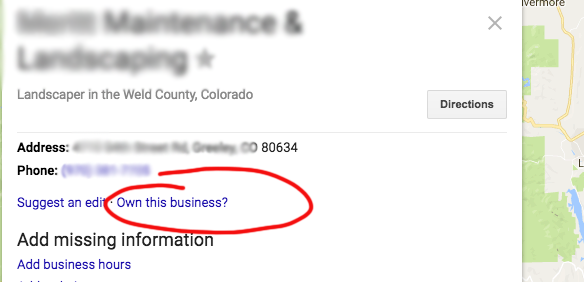
First, make sure you have claimed your business – you can do so by searching Google for your business and under the local listing clicking “Own this business?“. If you’re a new company, go ahead and follow the steps to set up your Google My Business account here.
Asking for Google reviews
Onto the important part – getting those 5-star reviews! Sometimes all you have to do is ask.
Since we want to make this as easy and quick as possible for your customers, provide them with a direct link to your Google My Business page. To do so:
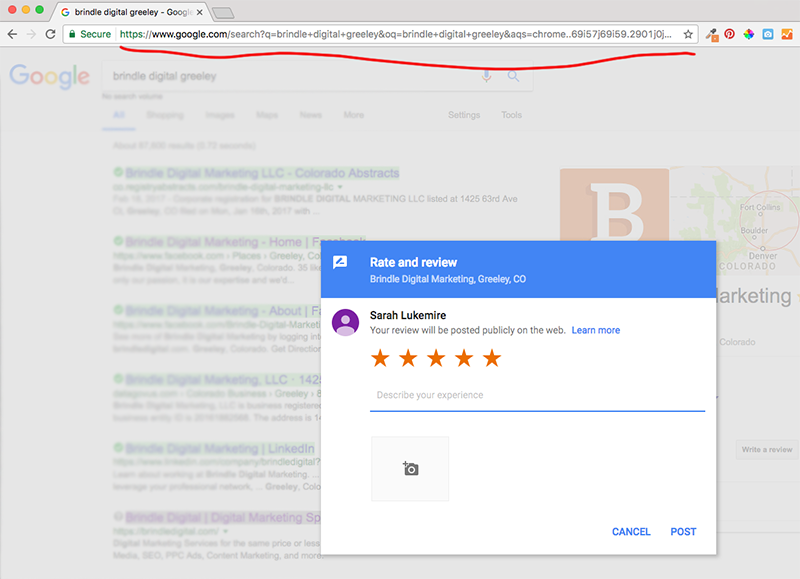
- Open your browser and go to Google.com. Search for your business.
- Click on the “write a review” button.
- Copy the entire link. Yikes. It’s really long – shorten it so it’s user-friendly (especially if you’re providing a link vs. using a button or hyperlinking text) with Google’s URL shortener.
- You’re all set, time to ask for Google reviews!
We recommend starting with this funnel approach:
- Ask your biggest fans first. You know the customers…they repeatedly visit your business or service and are your best advocates. Depending on your relationship, you can write them a quick email, give them a call, or kindly ask when they’re in your business. Email typically works best because you can provide a direct link.
- Send to your email subscribers or publish a post asking your social media fans.
- Add a review link/button on your website, the contact page is typically a good place.
Download our free Google review template below where you’ll find several samples of verbiage to use when for asking for reviews. Cheers to 5-star service and reviews!
[vcex_button url=”https://brindledigital.com/wp-content/uploads/2017/05/Google_Review_Samples_BrindleDigital.pdf” title=”Google sample review request” style=”graphical” align=”left” color=”#E67C3E” size=”medium” target=”self” rel=”none”]Google Review Template[/vcex_button]